I have multiple friends with the same username on MoGO!. How can I identify the correct one for the trade?
It can happen to have multiple friends with the same username on MoGO!, making it difficult to know who to complete the trade with. In these cases, follow this procedure.
If the friend request popup did not appear on MoGO! and you don’t see the notification showing the avatar of the newly added friend in the “Friends” section, you can proceed directly by starting the sticker trade:
-
Open your MoGO! album
-
Select the sticker you need to send
-
Tap “Send to friend”
-
Search for the username of the user you want to trade with
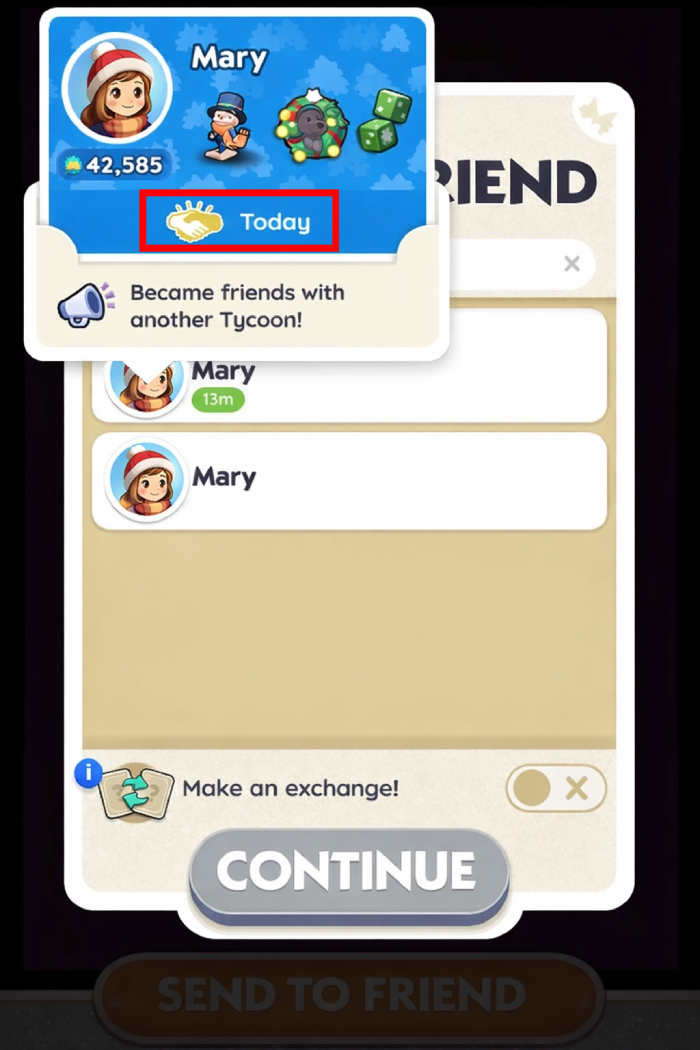
You may now see two or more users with the same name and avatar (or just the same username).
Tap on the avatars to view additional information, including how long you’ve been friends.
By selecting the user whose friend date shows “Today”, you can be sure you’re choosing the recently added friend and completing the trade correctly.